Business Process Automation Nepal: 2026 Guide

Picture a growing business in Kathmandu or Pokhara. It started simple: Excel for records, WhatsApp for approvals, email for quotations, and a separate accounting package. For a while, it worked.
Then the team grew. Now the same customer is typed into three places. A leave request is buried somewhere in a Viber group. Month-end reporting means three people, five spreadsheets and one very long evening. And nobody is completely sure which file is the latest version.
Nothing here is broken because people are careless. The business simply outgrew the way it was working.
That is the problem business process automation solves. In this guide, we explain what it actually means, which processes are worth automating first, where AI genuinely helps, what drives the cost in Nepal, and, just as important, what you should not automate.
What Is Business Process Automation?
Business process automation (BPA) means using software to carry out the repeatable steps of a business process, so people spend their time on decisions and relationships instead of copying, chasing and reminding.
Every automated workflow follows the same basic shape:
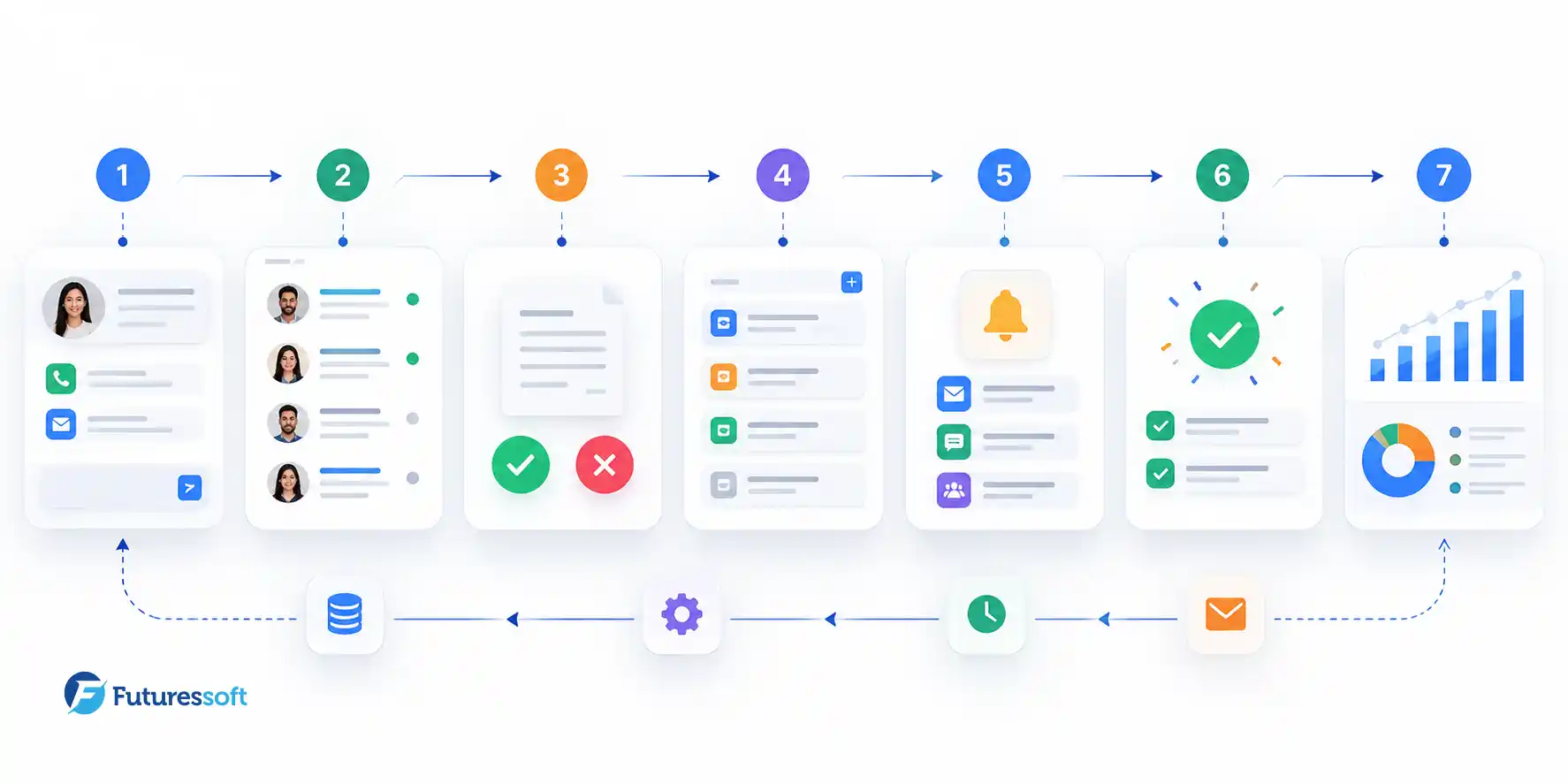
Trigger → Rule → Action → Result
Take a website inquiry:
- Trigger: A customer fills in your contact form.
-
Rule: If the inquiry is about a corporate package, it goes to the senior sales person; otherwise, to the general team.
-
Action: The lead is saved in your CRM, the right person gets a notification, and a follow-up task is created with a reminder date.
-
Result: Nothing is forgotten, and management can see the pipeline without asking anyone.
Notice what stays human: the actual conversation with the customer. Good automation removes the administrative work around a task, not the judgement inside it.
A quick note on terms. You will see "workflow automation" and "business process automation" used almost interchangeably. In practice, workflow automation usually describes a specific sequence (such as an approval chain), while business process automation covers the broader picture: several workflows, systems and departments working together.
Why It Matters for Businesses in Nepal
Most Nepali businesses we speak with do not need "digital transformation." They need fewer things to fall through the cracks. A few patterns come up again and again:
- Excel as the system of record. Flexible and familiar, but it has no permissions, no audit trail and no alerts.
-
Approvals through chat apps. A purchase approval given on WhatsApp is hard to find three months later.
-
Duplicate data entry. Sales enters a customer, accounts enters the same customer again, support enters them a third time.
-
Disconnected tools. The website, CRM, accounting software and payment gateway do not talk to each other.
-
Multi-branch complexity. Once you have more than one office or outlet, "just ask the manager" stops scaling.
-
Local integrations. Payments through eSewa, Khalti, Fonepay or bank transfers; SMS notifications; VAT-compliant invoicing. Each is a manual step until someone connects it.
The honest value of automation is not magic. It is consistency, visibility and time. We avoid quoting dramatic percentages here because results depend entirely on the process, the team and the quality of the implementation.
10 Business Processes You Can Automate
You do not need to automate everything. These are the areas where we most often see a clear, measurable payoff.
1. Lead management. Website inquiry → CRM → automatic assignment → follow-up task → reminder if untouched. Missed leads are usually a process problem, not a people problem.
2. Quotations and sales approvals. Inquiry → quotation from a template → discount approval → customer notified → status tracked.
3. Invoicing and payment follow-up. Invoice created → sent → reminder before the due date → payment status updated → accounting record synced.
4. Employee requests and approvals. Leave, advance or expense request → manager approval → HR record updated → employee notified. No chasing.
5. Inventory alerts. Stock falls below a threshold → alert → purchase request raised → approval → supplier notified.
6. Customer support. Ticket created → assigned → escalated if unanswered within a set time → resolved → customer notified.
7. Document workflows. Upload → validation → review → approval → archive with a clear version history.
8. Reporting. Data collected from sales, finance and operations → processed → shown on a live dashboard instead of a monthly spreadsheet marathon.
9. Appointments and bookings. Booking → confirmation → reminder → attendance record, useful for clinics, consultancies, salons and training institutes.
10. Internal notifications. A system event (new order, failed payment, low stock) automatically alerts the right person, instead of someone remembering to forward a message.
Is Your Process Ready? A Simple Readiness Checklist
Before spending a rupee, run each candidate process through these seven questions. This is a practical rule of thumb we use in discovery conversations, not a scientific formula.
|
Question |
Yes / No |
|
Is it repeated daily or weekly? |
|
|
Does it follow predictable rules? |
|
|
Is the same data entered more than once? |
|
|
Does it involve more than one system or department? |
|
|
Does it cause delays or errors today? |
|
|
Can you measure the result (time, errors, turnaround)? |
|
|
Does it need human judgement at every step? (Answer honestly. "Yes" here counts against automation.) |
How to read it: Count your "Yes" answers on the first six questions, then subtract one if the seventh is a "Yes."
- 5 or more: strong candidate, start here.
-
3 to 4: worth a closer look; map the process first.
-
0 to 2: automation may not be the right fix yet.
Signs Your Business Needs Workflow Automation
If several of these sound familiar, you are probably past the point where spreadsheets and chat groups are enough:
- Staff repeatedly enter the same information in different places
-
Approvals get stuck in email or WhatsApp
-
Reports need manual compilation
-
Follow-ups are missed because nobody was reminded
-
Errors keep recurring in the same step
-
Growth is increasing admin work faster than revenue
-
Management cannot see what is happening in real time
We cover this from a broader angle in our article on the signs your business needs custom software. Automation is often the smartest first step before replacing your entire software stack.
Business Process Automation vs ERP vs CRM vs Custom Software
These terms get mixed up constantly, so here is the simple version:
|
Solution |
Main purpose |
Best for |
|
CRM |
Managing customers and sales pipeline |
Lead tracking and customer relationships |
|
ERP |
Running multiple core functions in one system |
Finance, inventory, HR and operations together |
|
Workflow automation |
Automating specific processes and handoffs |
Repetitive tasks, approvals and notifications |
|
Custom software |
Building exactly what your unique process needs |
Businesses whose workflow does not fit off-the-shelf tools |
|
SaaS |
Software delivered by subscription |
Using ready-made tools, or building a product to sell |
They are not rivals. Many businesses need a mix. If you are weighing a full system, our guide to ERP software development in Nepal explains when it makes sense. If you are not ready for an ERP, targeted automation of two or three painful workflows is often the better first step. And if you are considering building a subscription product, see our overview of SaaS development in Nepal.
How AI Is Changing Business Process Automation in 2026
Traditional automation follows fixed instructions: if X happens, do Y. It is dependable, but it breaks when the input is messy.
AI-assisted automation can handle some of that mess. The pattern looks like this: understand the input → interpret it → decide within rules you define → act → send unusual cases to a human.
Where it genuinely helps today:
- Document extraction: reading invoices, bills and forms and pulling out the fields.
-
Classification and routing: sending a support message or email to the right team.
-
Lead qualification: scoring and prioritising inquiries.
-
Summaries: condensing long threads, call notes or reports.
-
Natural-language reporting: asking your data a question and getting an answer.
-
Anomaly flagging: spotting unusual transactions for review.
Two cautions. First, AI should work inside clear limits, and anything sensitive or high-value should land with a person for approval. Second, "AI-powered" is not a strategy. A badly designed process with AI on top is still a badly designed process. Fix the workflow first, then add intelligence where it earns its place.
Integrations: What Makes Automation Actually Work
Automation lives or dies on whether your systems can exchange data. That is what APIs and integrations do. Common examples:
- Website → CRM (inquiries land automatically)
-
Payment gateway → accounting (payments reconcile without retyping)
-
E-commerce store → inventory (stock updates on every order)
-
CRM → email or SMS (follow-ups go out on time)
-
ERP or database → dashboard (live reporting)
This is why automation projects are rarely just "a script." They involve understanding the systems you already own and connecting them safely. Integration is a core part of our custom software development services, alongside API development.

How a Business Process Automation Project Works
A good project is mostly thinking before building. Here is the path we follow, in plain terms:
- Discovery: understand how the process really works today, including the workarounds.
-
Process mapping: document every step, owner and handoff.
-
Bottleneck analysis: find what is slow, repetitive or error-prone.
-
Automation strategy: decide what to automate and what should stay human-controlled.
-
Architecture and integrations: plan data, permissions, APIs and workflow rules.
-
UI/UX design: design the dashboards and approval screens people will actually use.
-
Development: build in short cycles so you see progress early.
-
Testing: check failures, edge cases and user permissions, not only the happy path.
-
Deployment: move to production with training.
-
Monitoring and improvement: measure the results and refine.
Skipping the first four steps is the most common reason automation disappoints. You can read more about how we work on our software development process page.
How Much Does Business Process Automation Cost in Nepal?
There is no honest flat price, because "automation" can mean a single approval flow or a company-wide system. What we can do is show you what moves the number:
- Number of workflows to automate
-
Number of users and roles
-
Number of systems to integrate (and how well their APIs are documented)
-
Complexity of rules and approval layers
-
Whether AI features are involved
-
Dashboards and reporting needs
-
Security and audit requirements
-
Data migration from old files or systems
-
Hosting and cloud setup
-
Ongoing maintenance and support
A smart way to control cost is to start with one high-value workflow, prove the result, then expand. For the broader picture of how scope, security and infrastructure affect pricing, read our guide to custom software development cost in Nepal. Not every problem needs a full platform; sometimes a focused workflow plus a couple of integrations is exactly right.
Examples by Industry
-
Retail: low-stock alerts, purchase approvals, daily sales summaries.
-
Education: admission → document verification → fee → notification → student record. See how this ties into school website development in Nepal.
-
Travel: inquiry → quotation → booking → payment → confirmation. Our guide to travel software development covers the wider system.
-
Media: content draft → editorial review → publishing → distribution.
-
Professional services: lead → proposal → approval → invoice → follow-up.
-
Logistics: order → assignment → delivery → status update → reporting.
What You Should NOT Automate
This is the part most vendors skip, but it saves the most money.
- Decisions that need real human judgement, such as hiring choices or complaint resolution.
-
Processes nobody has defined. If three people do it three ways, standardise first.
-
Rare events. If it happens twice a year, a checklist is cheaper than a system.
-
Unstable workflows that change every month.
-
Sensitive actions without controls, like large payments with no approval step.
-
Anything where the automation costs more than the problem.
Sometimes the best advice we can give is "fix the process, then talk to us."

How to Choose a Business Process Automation Company in Nepal
Questions worth asking any provider, including us:
- Do they take time to understand your current workflow before proposing anything?
-
Can they connect with the software you already use?
-
Do they build custom solutions, or only configure third-party tools? (Both are valid; you should know which you are buying.)
-
What does their testing and security process look like?
-
Can the system grow with you?
-
What support exists after launch?
-
Can they show real production work? Browse our case studies for platforms we have built and run.
-
Who owns the code and the data?
Why Futuressoft
Business process automation is part of our custom software work in Nepal, not an afterthought. We handle the full chain, from discovery and architecture through development, integration, cloud deployment and long-term maintenance, so you are not coordinating several vendors for one workflow.
If you want a sensible starting point, we will review one of your processes with you and tell you plainly whether automation is worth it, and if so, where to begin.
Frequently Asked Questions
What is business process automation?
It is the use of software to handle repeatable steps in a business process, such as routing, notifications, data entry and approvals, so staff focus on work that needs judgement.
What is the difference between workflow automation and business process automation?
Workflow automation usually refers to a specific sequence of tasks. Business process automation is broader and often connects several workflows, systems and departments.
Which processes should be automated first?
Start with tasks that are frequent, rule-based, error-prone and involve more than one system. Lead handling, approvals, invoicing and reporting are common first choices.
How much does it cost in Nepal?
It depends on the number of workflows, users, integrations, security needs and whether AI is involved. A focused first workflow costs far less than a company-wide system, and a discovery call is the quickest way to get a realistic estimate.
Can automation work with our existing software?
Often yes, through APIs and integrations. During discovery we check what your current tools support.
Can AI be used for business process automation?
Yes, for tasks like document reading, classification, summaries and routing, ideally with human review for sensitive decisions.
Is ERP better than workflow automation?
Neither is universally better. An ERP suits businesses wanting one integrated system across functions; workflow automation suits those who want to fix specific problems without replacing everything.
Can Futuressoft build custom workflow automation?
Yes. We design and build custom workflows, integrations and dashboards around how your business actually operates.
Have a process that keeps eating your team's time?
Start with a workflow review. Tell us how it works today, and we will tell you honestly what is worth automating.
Related Insights