Cloud Migration in Nepal: A Business Guide

A few years ago, running the company's software from a server in the back office felt perfectly sensible. It was close, it was yours, and you could see the little green lights blinking. Then the business grew. A second branch opened. Someone needed to approve invoices from home. The server started to groan during the month-end, and the one person who understood how it all worked went on leave at exactly the wrong time.
This is the moment most Nepali businesses start asking about cloud migration in Nepal. Not because the cloud is fashionable, but because the old setup has quietly become a risk.
The good news is that moving to the cloud is a solved problem. The less comfortable news is that it is not a copy-and-paste job. A migration touches your applications, your databases, your security, your team's habits and your monthly costs. Done thoughtfully, it makes the business more resilient. Done in a hurry, it just moves the same problems to a more expensive place.
This guide walks through what cloud migration really involves, how to choose a strategy and a provider, what it costs (and what drives that cost), the risks worth planning for, and the considerations that are specific to Nepal.
What Is Cloud Migration?
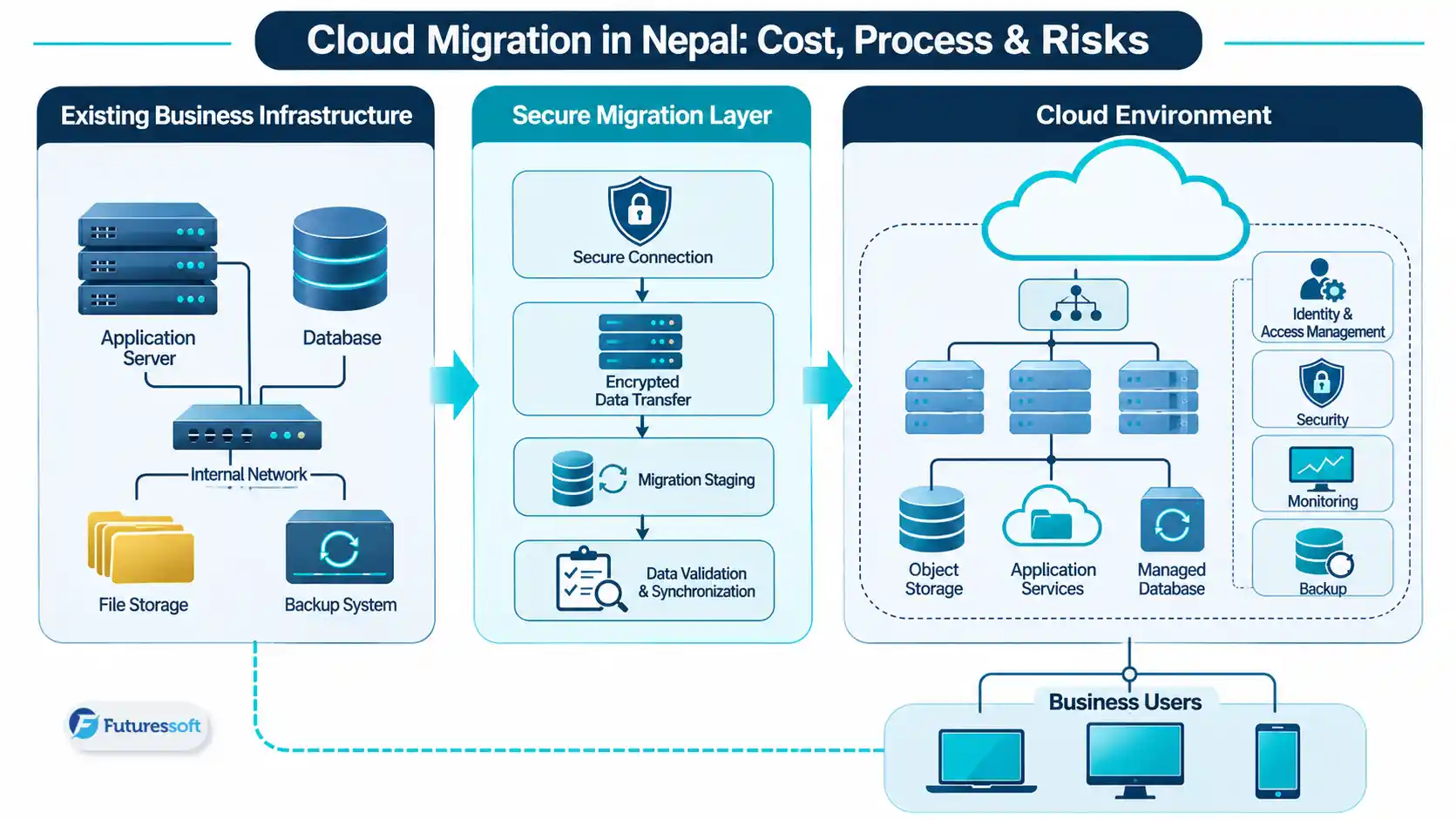
Cloud migration is the planned process of moving business applications, databases, files and workloads from traditional servers or existing hosting environments to cloud infrastructure such as AWS, Microsoft Azure or Google Cloud. For businesses in Nepal, a successful migration requires proper planning, data security, application compatibility, cost assessment and ongoing infrastructure monitoring.
In practice, almost anything can move: a company website, an ERP or accounting system, a customer portal, a mobile app's backend, internal tools, databases, backups and file storage. Some systems move as they are. Others need changes first. And a few should stay where they are, which we will come to.
It helps to understand the three common models:
- Public cloud: resources run on a provider's shared infrastructure (AWS, Azure, Google Cloud) and you pay for what you provision.
-
Private cloud: infrastructure dedicated to one organisation, either in its own facility or hosted for it.
-
Hybrid cloud: a mix of both, often used when some systems must remain on-site while others benefit from cloud flexibility.
Cloud vs. traditional infrastructure at a glance
|
Traditional infrastructure |
Cloud infrastructure |
|
|
Hardware |
You buy, house and replace physical servers |
Provider manages the underlying hardware |
|
Capacity |
Planned in advance, often over-bought |
Adjusted as demand changes |
|
Maintenance |
Handled locally by your team |
Shared between provider and your team |
|
Cost pattern |
Large upfront purchase, then upkeep |
Ongoing, usage-based charges |
|
Access |
Often tied to the office network |
Available remotely, depending on configuration |
One honest caveat: the cloud is not automatically cheaper or more secure. A badly configured cloud environment can be both expensive and exposed. The benefits come from good architecture and good operating habits, not from the logo on the invoice.
When Does a Business Actually Need to Migrate?
Not every business needs the cloud tomorrow. These are the signals we see most often that it is time to seriously consider it.
Your server cannot keep up with growth. If adding users or branches means slower screens and more complaints, you are hitting a capacity ceiling. Buying a bigger server solves it once; the cloud lets you scale as you go.
Your website or application has performance problems. Slow pages during campaigns, timeouts at peak hours, or a system that crawls whenever reports are generated all point to infrastructure that cannot flex.
Maintenance has become a burden. Patching, hardware failures, power and cooling, expiring licences and "only one person knows the setup" are all signs that infrastructure is consuming attention it should not.
You need remote and multi-branch access. If staff connect through awkward VPNs or exported spreadsheets, a centrally hosted system is usually a big quality-of-life upgrade.
Backup and disaster recovery are weak. Be honest about this one. If your only backup sits in the same room as the server, a fire, flood or theft takes both. Restoring from a backup you have never tested is a hope, not a plan.
Your development workflow is slow. If deploying a small fix means a nervous evening of manual steps, modern deployment pipelines will pay for themselves quickly.
Your software is aging. Older systems that cannot integrate with modern services often need modernisation alongside migration. Our guide to legacy software modernisation covers that side of the story.
A quick readiness checklist
If you can tick most of these, you are ready to plan seriously:
- You know which applications and databases you run, and who depends on them.
-
You have a named owner for each system.
-
You know how much downtime the business can tolerate.
-
You have a recent, tested backup.
-
You have a rough budget range for both migration and ongoing operation.
-
Your team understands why the move is happening.
Cloud Migration Strategies: Choosing How to Move
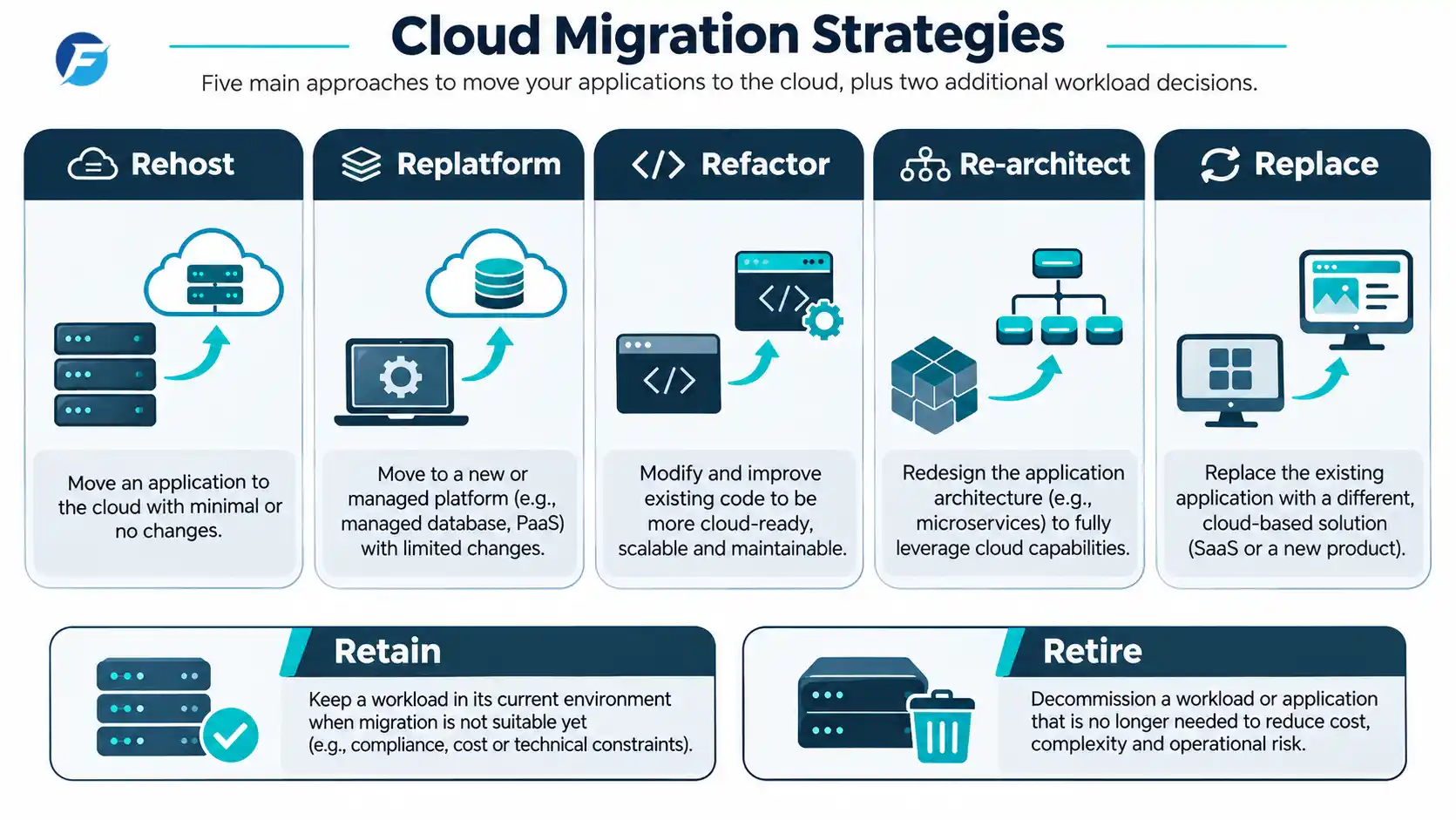
There is no single way to migrate. The right approach depends on how each application is built and what you want from it afterwards. The industry commonly describes these options as the "Rs" of migration, and AWS documents them in its migration strategies guidance.
|
Strategy |
What it means |
Best suited to |
|
Rehost |
Move the application with minimal change ("lift and shift") |
Compatible systems that must move quickly |
|
Replatform |
Move to a managed or improved platform with small adjustments |
Reducing day-to-day infrastructure management |
|
Refactor |
Change code to take advantage of cloud capabilities |
Improving scalability and maintainability |
|
Re-architect |
Redesign the application's structure |
Systems needing major structural change |
|
Replace |
Switch to a different software product |
Software that no longer fits the business |
|
Retain |
Keep the system where it is for now |
Systems with regulatory, technical or cost reasons to stay |
|
Retire |
Switch the system off |
Applications nobody really uses any more |
Two things are worth saying about this table.
First, rehosting is fast but not always smart. Moving an inefficient application unchanged can give you the same problems with a monthly bill attached. It is a sensible first step for some systems, but it should be a decision, not a default.
Second, retire and retain are underrated. In almost every assessment we would expect to find at least one system that nobody needs anymore. Switching it off is the cheapest migration there is.
A simple decision matrix
When you review each workload, ask two questions: how healthy is the application, and how much does the business depend on it?
|
Situation |
Usually points to |
|
Stable, compatible, needs to move soon |
Rehost |
|
Stable, but you want less server management |
Replatform |
|
Business-critical, struggling with performance or scale |
Refactor or re-architect |
|
Outdated, poorly supported or hard to integrate |
Replace |
|
Rarely used, no clear owner |
Retire |
|
Tied to local hardware or restrictive requirements |
Retain, revisit later |
AWS vs. Microsoft Azure vs. Google Cloud
All three major providers are mature, secure when configured properly, and capable of hosting almost any business workload. The question is rarely "which is best?" and almost always "which fits this workload and this team?"
Amazon Web Services (AWS) has the broadest catalogue of services, covering compute, storage, managed databases, monitoring and a large migration toolset. Its size is an advantage, but it can also feel like a lot to navigate without experienced guidance.
Microsoft Azure tends to appeal to organisations already invested in Microsoft technology, such as Windows Server, SQL Server, Active Directory and Microsoft 365. It also has strong support for hybrid setups where some systems remain on-premises.
Google Cloud is well regarded for its data and analytics services, managed Kubernetes and application deployment tools, and often attracts teams building data-heavy or container-based products.
Rather than crowning a winner, compare them against your own situation:
|
Evaluation factor |
What to ask |
|
Compatibility |
How well does it work with the software and databases we already run? |
|
Managed services |
Does it offer the specific services this workload needs? |
|
Team experience |
Which platform does our team (or partner) know best? |
|
Security and governance |
Can it meet our access, audit and data-handling requirements? |
|
Total operating cost |
What does this workload cost to run month after month? |
The last row matters most. Always price your actual workload using each provider's calculator rather than comparing headline rates. Microsoft's Cloud Adoption Framework is also a useful reference for structuring planning, governance and security decisions, whichever platform you choose.
The Cloud Migration Process, Step by Step
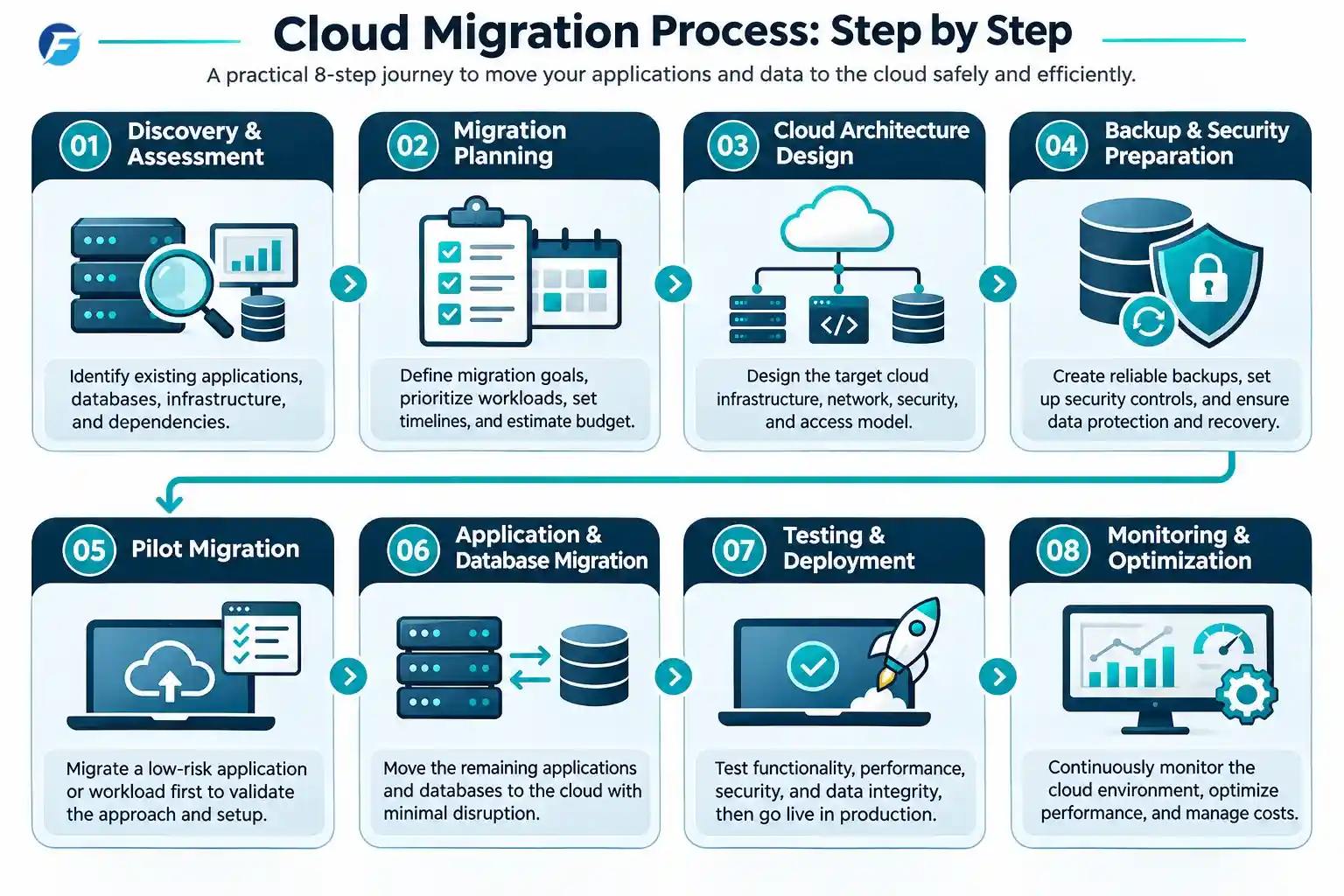
A well-run migration is mostly preparation. The actual "move" is a small part of the project.
1. Discovery and assessment. List every application, database, integration and dependency. This is where surprises surface: the forgotten scheduled job, the spreadsheet that feeds a report, the server nobody admits to owning. Skipping this step is the single most common cause of failed migrations.
2. Migration planning. Define what success looks like. Set priorities, an order of migration, a realistic budget and acceptable downtime. Agree who makes decisions when something unexpected happens.
3. Cloud architecture design. Choose the provider, regions, network layout, access controls and environment structure. Decisions made here shape security, performance and cost for years.
4. Backup and security preparation. Before moving anything, confirm that backups exist and can be restored. Set up encryption, role-based permissions and logging. Security is much easier to build in than to bolt on.
5. Pilot migration. Start with a lower-risk workload. A pilot exposes problems in your process while the stakes are small, and it gives the team confidence.
6. Application and database migration. Move the chosen workloads, then verify the data carefully: record counts, totals, key reports, user logins. "It seems to work" is not verification.
7. Testing and go-live. Test functionality, security and performance under realistic conditions. Plan the cutover for a quiet period and keep a clear rollback path in case something goes wrong.
8. Monitoring and optimisation. After go-live, watch performance, availability and cost. Cloud bills tend to drift upwards if nobody looks at them, so schedule regular reviews and right-size resources as real usage becomes clear.
AWS also publishes guidance on assessing migration readiness, which is worth reading before you plan in detail.
How Much Does Cloud Migration Cost in Nepal?
Honest answer: it depends, and anyone quoting a fixed price without looking at your systems is guessing. A small website move and a multi-system business migration are different projects with different budgets.
What we can do is show you what actually drives the cost.
|
Cost component |
What affects it |
|
Assessment |
Number of systems, documentation quality, complexity of dependencies |
|
Infrastructure |
CPU, memory, storage and availability requirements |
|
Migration work |
Application complexity, code changes needed, data volume |
|
Databases |
Size, type and downtime tolerance |
|
Bandwidth and data transfer |
How much data moves, and how often it leaves the cloud |
|
Security and monitoring |
Access controls, encryption, logging and alerting |
|
Backup and recovery |
Retention period and recovery speed |
|
Ongoing support |
Engineering hours for maintenance, patching and optimisation |
The most important distinction is between one-time and recurring costs.
One-time costs include assessment, planning, architecture, the migration itself and any application changes. Recurring costs include the cloud resources you consume each month, backups, monitoring tools and ongoing support. Many businesses budget carefully for the first group and are surprised by the second. A sensible plan estimates both before work begins, and compares the total cost of running the workload in the cloud against keeping it on-premises, including electricity, hardware replacement and staff time.
If you are also weighing a software rebuild alongside the move, our breakdown of custom software development costs in Nepal will help you set expectations.
Common Risks and How to Prevent Them
Most migration problems are predictable, which means most are preventable.
|
Risk |
How to prevent it |
|
Unexpected downtime |
Schedule cutovers in quiet periods, rehearse them, keep a rollback plan |
|
Data loss or incomplete migration |
Take verified backups first and reconcile data after every move |
|
Security misconfiguration |
Use least-privilege access, enable logging, review settings before go-live |
|
Surprise cloud bills |
Set budgets and alerts, tag resources, review usage monthly |
|
Application incompatibility |
Test in a staging environment before touching production |
|
Vendor lock-in |
Favour open standards where practical and document your architecture |
|
Latency and performance |
Test from real user locations and choose regions thoughtfully |
|
Weak recovery planning |
Define recovery targets and actually test restoring from backup |
If you remember one thing from this table, make it the last row. Plenty of organisations have backups. Far fewer have proved they can restore them.
Cloud Migration Considerations Specific to Nepal
Most cloud migration guides are written for a generic international audience. Businesses here have a few extra things to think about, and ignoring them is how "successful" migrations produce embarrassing problems later.
Nepali dates and the fiscal year. Many systems store or display Bikram Sambat dates and report against the Nepali financial year. Make sure transaction dates, reports and period-end processes carry exactly the same meaning after migration.
Legacy fonts and Unicode. Older systems often contain text in legacy encodings such as Preeti. If data is moved carelessly, Nepali text can turn into unreadable symbols. Check character handling early and test with real records, not sample data.
Local integrations. Payment gateways, banking services, SMS providers and government or business systems you connect to may have IP restrictions, callback URLs or version requirements. Confirm each one still works from the new environment before cutover.
Connectivity. Cloud systems depend on reliable internet. Consider how branch offices will connect, what happens during an outage, and whether any critical process needs an offline fallback.
Data protection and contracts. Understand your contractual obligations, sector requirements and any applicable data-handling rules before choosing where data is hosted. Where you are unsure, take qualified legal advice.
Local support and handover. A migration is only as good as the people who can support it afterwards. Ask who monitors the environment, who responds when something breaks, and how documentation will be handed over to your team.
Cloud vs. On-Premise: An Honest Comparison
|
Factor |
Cloud |
On-premise |
|
Initial investment |
Lower upfront |
High upfront hardware cost |
|
Ongoing expenses |
Recurring, usage-based |
Maintenance, power, replacement |
|
Scalability |
Flexible |
Limited by purchased hardware |
|
Maintenance |
Shared with the provider |
Entirely your responsibility |
|
Security responsibility |
Shared model: provider secures infrastructure, you secure configuration and data |
You manage everything |
|
Data access |
Remote-friendly |
Usually office-bound |
|
Disaster recovery |
Easier to build across locations |
Requires separate site and hardware |
|
Best for |
Growing, distributed or fast-changing businesses |
Stable workloads with specific local requirements |
Cloud is not always the answer. On-premise or hybrid can still make sense when a workload has strict latency needs, depends on specialised local hardware, faces particular regulatory constraints, or is stable, predictable and already paid for. A good partner will tell you when something should stay put.
How to Choose a Cloud Migration Company in Nepal
Your choice of partner matters as much as your choice of platform. Use this checklist when evaluating providers:
- Architecture experience. Can they design cloud environments, not just move files?
-
Application and database migration experience. Ask for specifics about similar systems.
-
Security and backup practices. How do they handle access, encryption and recovery?
-
Platform experience. Real, hands-on experience with AWS, Azure or Google Cloud.
-
Deployment capability. CI/CD pipelines and automated deployments.
-
Monitoring and support. Who is watching after go-live, and how quickly do they respond?
-
A clear scope and estimate. Vague proposals lead to disputed invoices.
-
A documented rollback plan. If they cannot explain what happens when things go wrong, keep looking.
Ask to see how they have handled something similar, and be wary of anyone promising zero risk or a fixed price before assessing your systems.
Cloud Migration and DevOps Services at Futuressoft
At Futuressoft, we help businesses plan and carry out moves to the cloud, and support them afterwards. Our cloud and DevOps services include:
- Cloud migration planning and execution
-
Cloud infrastructure management
-
DevOps consulting
-
CI/CD implementation
-
Infrastructure automation
-
Monitoring and optimisation
-
Application modernisation and deployment
We also build the applications that run on this infrastructure, from web applications to SaaS platforms, so migration decisions can be made with the whole system in mind rather than one layer at a time.
Frequently Asked Questions
What is cloud migration?
Cloud migration is the process of moving applications, databases and data from on-site servers or existing hosting to cloud platforms such as AWS, Azure or Google Cloud. It usually involves assessment, planning, security setup, data transfer, testing and ongoing monitoring afterwards.
How much does cloud migration cost in Nepal?
There is no standard price. Cost depends on the number of systems, data volume, application complexity, security needs and the support you want afterwards. Expect both one-time migration costs and recurring monthly cloud charges. A proper assessment is the only reliable way to get an accurate estimate.
How long does cloud migration take?
A simple website or single application can move in days or weeks, while a multi-system migration with databases and integrations can take months. Discovery, testing and data verification usually take longer than the transfer itself, so build time for them into your plan.
Which is better for businesses: AWS, Azure or Google Cloud?
None is universally better. Azure often suits Microsoft-centred organisations, AWS offers the widest service range, and Google Cloud is strong in data and containers. Choose based on your applications, your team's skills, governance needs and the projected running cost of your workload.
Can existing business software be migrated without rebuilding?
Often yes. Compatible applications can be rehosted or replatformed with limited change. Older software with hard-coded dependencies or unsupported components may need modification first, and some systems are better replaced. An assessment will tell you which category yours falls into.
Is cloud migration safe?
It can be, provided it is planned and configured properly. Major providers invest heavily in infrastructure security, but you remain responsible for access control, configuration and data handling. Most security problems in the cloud come from misconfiguration, not from the platform itself.
Can a business migrate without downtime?
Sometimes, but not always. Careful planning, staged cutovers and data synchronisation can reduce downtime to a short window or avoid it for some systems. Zero downtime is not guaranteed, so agree on an acceptable outage window beforehand.
Does cloud migration reduce IT costs?
It can, but not automatically. Savings usually come from less hardware, flexible capacity and reduced maintenance. Poorly managed cloud usage can cost more than on-premise. Monitoring and regular optimisation are what keep the costs under control.
Conclusion: Plan the Move Before You Make It
A successful cloud migration is rarely about the cloud itself. It is about knowing what you run, deciding what each system actually needs, building security and recovery in from the start, and having people who will look after the environment once the excitement of go-live fades.
Start with an honest inventory. Be willing to retire or retain what does not belong in the cloud. Price the running costs, not just the move. And pay attention to the details specific to Nepal, from fiscal-year logic to Unicode, because that is where generic advice runs out.
Planning to move your business applications or infrastructure to the cloud? Discuss your cloud migration project with Futuressoft and we will help you work out a sensible strategy, before you commit to one.
Related Insights