
Enterprise CMS Development for Media Companies
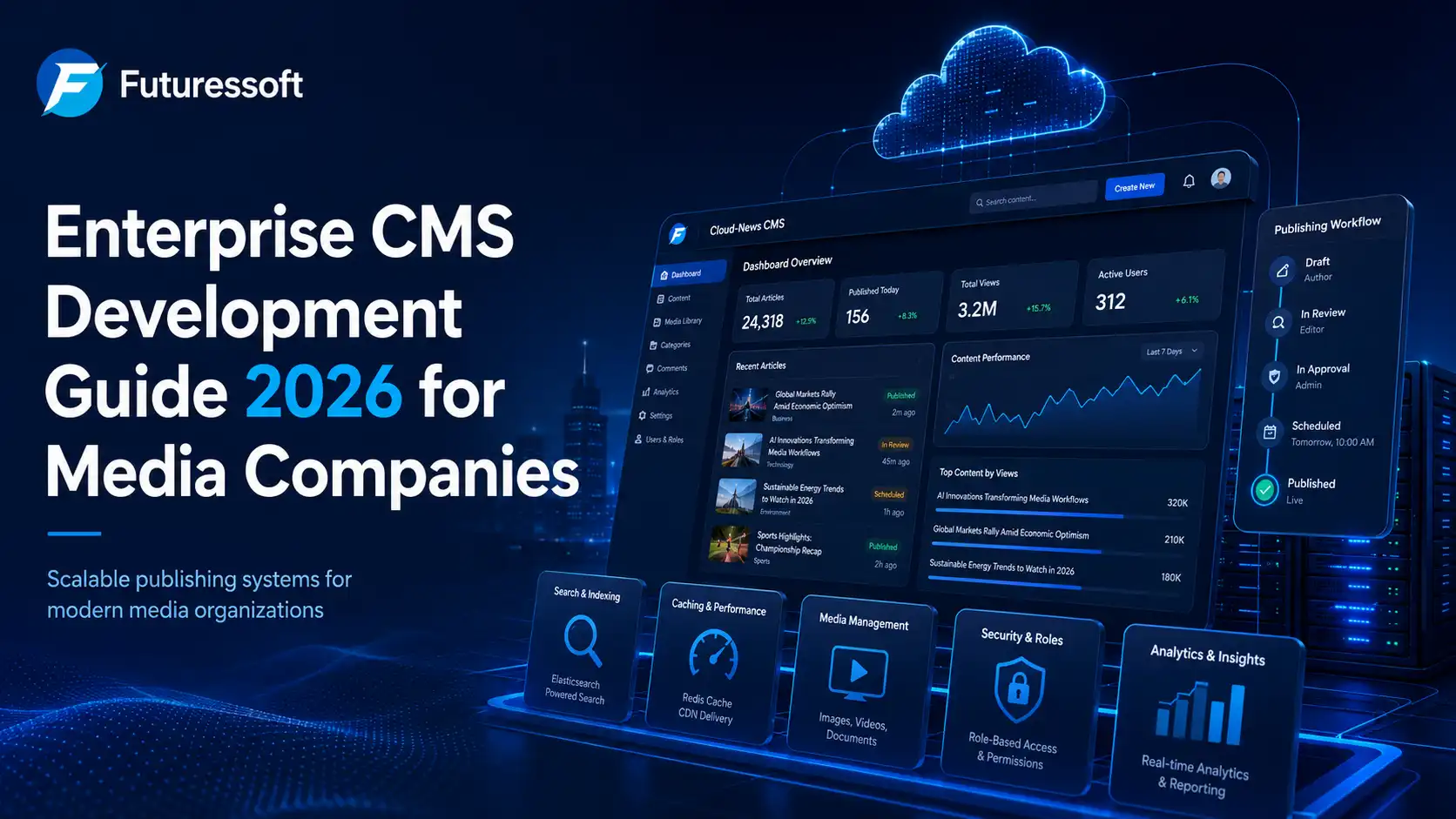
Media companies are no longer competing only on the quality of their stories. They are also competing on speed, user experience, publishing efficiency, mobile performance, search visibility, and the ability to manage large volumes of content without slowing down.
For news portals, digital magazines, video platforms, and content-driven organizations, a basic website or simple CMS is often not enough. Editorial teams need a system that allows them to publish quickly, manage content properly, handle traffic spikes, protect user data, and deliver content across web, mobile, social, newsletters, and syndication channels.
This is where enterprise CMS development for media companies becomes important.
An enterprise CMS is not just a place to write and publish articles. It is a complete content management system built to support editorial workflows, large content databases, fast search, role-based access, high-performance delivery, and long-term scalability.
At Futuressoft, we understand these challenges closely through our work in custom software development, news portal development, and cloud-based CMS solutions. Our Cloud-News CMS is designed for media organizations that need speed, flexibility, performance, and control over their digital publishing operations.
What Is an Enterprise CMS for Media Companies?
A Content Management System, or CMS, is software that helps teams create, manage, and publish digital content. A basic CMS can work well for small blogs, company websites, or simple content pages.
But media companies usually need more than that.
A media company may have hundreds or thousands of articles, videos, authors, categories, tags, breaking news updates, photo galleries, live coverage pages, and archived content. The team may include editors, reporters, freelancers, copywriters, developers, SEO teams, designers, and business departments.
An enterprise CMS is built to support this level of complexity.
It helps media companies manage:
-
Large volumes of articles, videos, and media files
-
Editorial approval workflows
-
Breaking news publishing
-
Role-based access for different teams
-
Fast search and content discovery
-
Website, mobile app, newsletter, and syndication publishing
-
SEO-friendly content structure
-
High traffic during major events
-
Security, governance, and audit control
In simple terms, an enterprise CMS gives media companies a stronger foundation for digital publishing.
Why Generic CMS Platforms Are Not Always Enough for News Portals
Many media companies start with a basic CMS or a plugin-heavy website. In the beginning, this may feel affordable and easy to manage. But as the platform grows, problems begin to appear.
A generic CMS may become slow when the website has too many articles, images, plugins, categories, or users. It may not support proper editorial workflows. It may also become difficult to customize when the business needs mobile apps, custom dashboards, advanced search, or multi-channel publishing.
Common problems include:
-
Slow page loading during high traffic
-
Difficulty managing thousands of articles
-
Poor internal search experience
-
Too much dependency on plugins
-
Weak editorial approval process
-
Limited user permission control
-
Poor mobile performance
-
Difficulty scaling the platform
-
SEO issues caused by poor structure
-
Security risks due to outdated plugins or weak architecture
For a media company, these issues directly affect business performance. A slow website can reduce user engagement. Poor search can make old content difficult to find. Weak workflows can lead to publishing mistakes. Poor SEO structure can limit organic traffic.
That is why a growing media platform needs a CMS built around performance, scalability, and editorial control from the beginning.
Core Features Every Media-Grade Enterprise CMS Should Have
A strong enterprise CMS for media companies should not only help teams publish content. It should support the complete publishing ecosystem.
Below are the most important features every media-grade CMS should include.
1. Structured Content Management
Media content is not just plain text. A single story may include a headline, short summary, body content, author details, images, videos, quotes, related stories, tags, categories, SEO fields, and social media previews.
A good enterprise CMS should organize these elements as structured content.
This means editors can manage each part of the content properly instead of treating every page as one large block of text. Structured content also makes it easier to reuse the same story across websites, mobile apps, newsletters, and other channels.
For example, the same news article can be displayed differently on:
-
Website homepage
-
Mobile app
-
Category page
-
Author archive
-
Newsletter
-
Related article section
-
Social media preview
Structured content helps media companies maintain consistency while reducing duplicate work.
2. Editorial Workflow and Approval System
In a professional newsroom, content does not usually go directly from writer to publisher. There may be several steps, such as writing, editing, fact-checking, SEO review, approval, and publishing.
An enterprise CMS should support this process clearly.
A proper workflow may include:
-
Draft
-
Review
-
Edit
-
Approve
-
Schedule
-
Publish
-
Update
-
Archive
This allows every team member to know where the article stands. Writers can focus on writing, editors can review content, SEO teams can optimize it, and publishers can schedule it at the right time.
For media companies, this reduces confusion and helps maintain accuracy, especially during busy publishing hours or breaking news events.
3. Fast Search and Content Discovery
News websites often have large content archives. Without a powerful search system, it becomes difficult for users and editors to find relevant content quickly.
This is where search technology such as Elastic Search becomes valuable.
Elastic Search helps large news platforms provide faster search results, better filtering, and smarter content discovery. It can support search by title, keyword, tag, author, category, date, topic, and other custom fields.
For media companies, this improves both user experience and internal editorial efficiency.
A strong search system can help with:
-
Website search
-
Admin content search
-
Related article suggestions
-
Topic pages
-
Author archives
-
Tag-based discovery
-
Real-time content indexing
Futuressoft’s Cloud-News CMS focuses on this kind of performance-first content discovery for large-scale media platforms.
4. High-Performance Architecture with Caching and CDN
Performance is one of the most important parts of news portal development.
A media website may receive normal traffic on most days, but during elections, sports events, political updates, celebrity news, breaking news, or viral stories, traffic can suddenly increase. If the CMS and server architecture are not prepared, the website may slow down or go offline.
A media-grade enterprise CMS should include a performance-first architecture.
Important performance components include:
-
Server-side caching
-
Redis caching
-
Edge caching
-
CDN integration
-
Optimized database queries
-
Image compression
-
Lazy loading
-
Scalable cloud infrastructure
-
Clean frontend code
-
Load-balanced architecture when required
A CDN helps deliver content faster by serving website assets from locations closer to users. Caching reduces server load by serving frequently accessed content more efficiently. Together, these technologies help media platforms stay fast even when traffic increases.
For news companies, speed is not only a technical requirement. It affects user engagement, SEO, ad revenue, and brand trust.
5. Role-Based Access and Security
Media companies often work with multiple users, departments, and contributors. Not every user should have the same level of access.
For example:
-
A writer may only create drafts
-
An editor may review and edit articles
-
A publisher may approve and publish content
-
An admin may manage users and settings
-
A media manager may upload and organize images or videos
-
A developer may access technical settings
An enterprise CMS should provide role-based access control so that each user only gets the permissions they need.
This improves security and reduces the risk of accidental changes.
Security features may include:
-
Secure login
-
Role-based permissions
-
Two-factor authentication
-
Activity logs
-
Content change history
-
Backup systems
-
Secure API access
-
Protection against common web vulnerabilities
-
Regular security updates
For media organizations, security is especially important because websites are public-facing, high-traffic, and often politically or commercially sensitive.
6. Multi-Channel Publishing
Modern audiences consume news and media through many channels. They may read articles on a website, open updates from a mobile app, subscribe to newsletters, follow social media posts, or receive push notifications.
A modern CMS should support multi-channel publishing.
This means content should not be locked only to one website page. It should be possible to publish and distribute content across different platforms from one central system.
A strong enterprise CMS can support:
-
Website publishing
-
Mobile app content delivery
-
Newsletter integration
-
API-based content distribution
-
Social media previews
-
RSS feeds
-
Push notification systems
-
Syndication feeds
This helps media companies save time and maintain consistency across all channels.
7. SEO-Friendly CMS Structure
SEO is one of the most important traffic channels for media websites. A CMS should make SEO easy for editors and marketers, not difficult.
A good media CMS should support:
-
SEO title and meta description fields
-
Clean URL structure
-
Canonical tags
-
Schema markup
-
XML sitemap generation
-
Robots.txt control
-
Fast page loading
-
Image alt text
-
Internal linking
-
Breadcrumbs
-
Author pages
-
Category optimization
-
Related article modules
-
Proper heading structure
-
Mobile-friendly design
For news and media websites, SEO is not only about ranking one article. It is about building a strong content ecosystem where articles, categories, tags, authors, and related topics support each other.
A CMS that is built with SEO in mind can help teams publish content that is easier for search engines to crawl, understand, and rank.
How Futuressoft’s Cloud-News CMS Helps Media Companies
Futuressoft is a software development company based in Nepal, working in custom software development, web development, mobile app development, cloud solutions, and enterprise CMS development.
For media companies and news portals, Futuressoft offers Cloud-News CMS, a cloud-based news CMS designed for high-performance digital publishing.
Cloud-News CMS focuses on the key needs of modern media businesses:
-
Fast content publishing
-
Scalable architecture
-
Elastic Search integration
-
Multi-layer caching
-
CDN optimization
-
Custom workflows
-
Flexible content management
-
Better performance for high-traffic platforms
-
Custom development based on business requirements
Unlike a generic website setup, Cloud-News CMS can be customized around the actual workflow of a media company. This is important because every newsroom works differently. Some companies need heavy breaking news support. Some need mobile app integration. Some need video publishing. Some need strong archive search. Some need multiple editors, categories, and content approval layers.
Futuressoft can help design the CMS around these real requirements instead of forcing the business to adjust to a limited system.
Enterprise CMS Development Roadmap for Media Companies
Building or upgrading a CMS should be done carefully. A media CMS is not just a website project. It is a long-term digital platform that supports content, teams, users, revenue, and growth.
Here is a practical roadmap for enterprise CMS development.
Phase 1: Discovery and Requirement Planning
The first step is to understand the media company’s current workflow and future goals.
This includes reviewing:
-
Current website or CMS limitations
-
Editorial workflow
-
Content types
-
User roles
-
Publishing process
-
Traffic patterns
-
SEO requirements
-
Mobile app needs
-
Monetization needs
-
Security requirements
-
Performance expectations
At this stage, the goal is to clearly define what the CMS should do and what problems it must solve.
For example, a media company may need:
-
Faster article publishing
-
Better homepage management
-
Custom breaking news module
-
Better search function
-
Improved image handling
-
User role management
-
SEO-friendly article templates
-
Mobile app API
-
Better ad placement control
A clear requirement plan helps avoid confusion during development.
Phase 2: Content Model and System Architecture
After the requirements are clear, the next step is to design the content model and technical architecture.
The content model defines how different types of content will be structured.
Common content types include:
-
News articles
-
Opinion articles
-
Interviews
-
Videos
-
Photo galleries
-
Authors
-
Categories
-
Tags
-
Topics
-
Live updates
-
Breaking news
-
Sponsored content
The architecture defines how the CMS, database, search system, frontend, caching, CDN, and APIs will work together.
This stage is very important because poor architecture can create long-term problems. A well-planned architecture makes the system easier to scale, maintain, and improve.
Phase 3: CMS Backend and Editorial Dashboard Development
The backend is the main control center of the CMS. This is where editors and admins create, manage, review, and publish content.
A strong editorial dashboard should be simple, fast, and easy to use.
It may include:
-
Article creation panel
-
Media library
-
Category and tag management
-
SEO fields
-
Author management
-
Draft and review system
-
Publishing calendar
-
Breaking news control
-
Homepage layout management
-
User role management
-
Analytics integration
-
Revision history
For media teams, the dashboard should reduce work, not create extra steps. The best CMS interface is one that helps editors publish faster while keeping control and accuracy.
Phase 4: Frontend and Multi-Platform Integration
Once the CMS backend is ready, the frontend needs to be developed for users.
The frontend includes everything visitors see, such as:
-
Homepage
-
Article pages
-
Category pages
-
Search pages
-
Author pages
-
Video pages
-
Gallery pages
-
Topic pages
-
Mobile responsive layouts
For media websites, the frontend must be fast, clean, readable, and optimized for both users and search engines.
If the media company has a mobile app, the CMS can also provide content through APIs. This allows one content system to power multiple platforms.
Phase 5: Performance, SEO, and Security Testing
Before launch, the CMS should be properly tested.
Important testing areas include:
-
Page speed
-
Mobile performance
-
Load handling
-
Search accuracy
-
Editorial workflow
-
User permissions
-
SEO tags
-
Schema markup
-
Sitemap generation
-
Broken links
-
Image optimization
-
Security vulnerabilities
-
Backup and recovery process
This step helps make sure the platform is ready for real users, real traffic, and real publishing pressure.
Phase 6: Launch and Continuous Improvement
After testing, the CMS can be launched in a controlled way.
But launch is not the end of the project. A media CMS should continue to improve over time.
After launch, teams should monitor:
-
Website speed
-
Search performance
-
Server load
-
User behavior
-
Organic traffic
-
Publishing workflow issues
-
Crawl and indexing status
-
Content performance
-
Security logs
Based on the data, new features and improvements can be added.
A successful enterprise CMS should be treated as a long-term digital product, not a one-time website build.
Is Your Current CMS Ready for Media-Scale?
If you are managing a news portal or media website, ask these questions:
-
Can your CMS handle high traffic without slowing down?
-
Can your editors publish breaking news quickly?
-
Does your system support approval workflows?
-
Can you manage thousands of articles easily?
-
Is your website search fast and accurate?
-
Can your CMS support mobile app integration?
-
Does your platform have proper caching and CDN support?
-
Are your SEO fields easy to manage?
-
Can you control user roles and permissions?
-
Is your platform secure and scalable?
If the answer is “no” to several of these questions, your media company may need an enterprise CMS instead of a basic website setup.
Why Choose Futuressoft for Enterprise CMS Development?
Choosing the right CMS development partner is important. A media CMS needs technical planning, publishing knowledge, performance optimization, SEO understanding, and long-term support.
Futuressoft brings together custom software development, cloud-based architecture, media platform experience, and enterprise CMS development capabilities.
With Futuressoft, media companies can get:
-
Custom CMS development based on real business needs
-
Cloud-based architecture for better scalability
-
Elastic Search integration for faster content discovery
-
Redis and caching strategies for performance
-
CDN optimization for faster content delivery
-
Clean and responsive frontend development
-
SEO-friendly structure
-
Mobile app and API integration
-
Secure user role management
-
Long-term technical support and improvement
For media companies in Nepal and beyond, Futuressoft’s Cloud-News CMS provides a strong foundation for building modern, scalable, and performance-focused digital publishing platforms.
Final Thoughts
Media companies need more than a simple CMS. They need a platform that supports speed, scale, editorial control, SEO, security, and future growth.
A well-developed enterprise CMS can help news portals and content-driven businesses publish faster, manage content better, improve user experience, and prepare for long-term digital growth.
Whether you are building a new media platform or upgrading an existing news portal, investing in the right CMS architecture can make a major difference.
Futuressoft’s Cloud-News CMS is built for media companies that need a reliable, scalable, and performance-focused publishing system. With the right planning, technology, and development partner, your CMS can become the backbone of your entire digital media operation.
Related Insights
Introducing the New Futuresoft
Building Scalable Digital Products with Purpose, Integrity, and Excellence.